
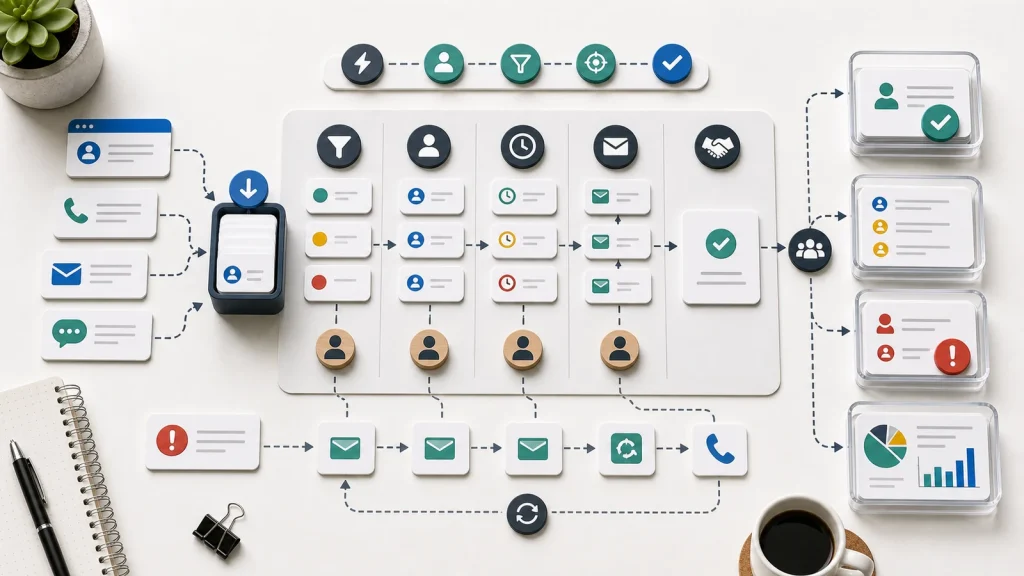
Lead response automation fails when the business automates the first reply but not the follow-up workflow behind it for sales teams.
Fast lead response matters, but speed alone does not create a reliable sales process.
A lead response workflow needs qualification, routing, owner assignment, follow-up rules, CRM updates, and review loops.
Automation should help the team respond with context instead of creating more reminders and disconnected tasks.
Start by mapping what happens from the first inquiry to the next real sales decision.
The First Reply Is Not The Workflow
Many teams start lead response automation with the first message. A form submission triggers an email. A chatbot sends a confirmation. A calendar link appears. A task is created for sales.
Those steps can help, but they do not guarantee a useful response. A fast reply is still weak if the wrong person owns the lead, the CRM record is incomplete, the request is not qualified, or the follow-up path depends on memory alone afterward.
Lead response automation should move the business toward a real sales decision. Is the lead a fit? What does the buyer need? Who should respond? What context should the responder see? What should happen if the lead does not answer? What should happen if the lead is urgent?
Without those answers, automation creates motion without control. The team responds faster but still loses leads through unclear ownership, inconsistent follow-up, or bad CRM data.
Qualification Should Happen Before Routing
Lead routing works better when the business knows what it is routing. A form submission may look like a new opportunity, but the request could be support, hiring, partnership, spam, an existing customer issue, or a poor-fit inquiry.
The response workflow should define the minimum qualification signals. Useful signals may include service interest, company type, location, budget range, urgency, existing customer status, source channel, and the message itself. The exact fields depend on the business.
A good workflow also decides when qualification requires a person. Automation can classify obvious requests. Ambiguous or high-value leads often deserve review before the system sends the lead down a generic path.
This is the same operating lesson behind customer intake workflows. A form is not the workflow. The business needs rules for turning the submission into a responsible next step.
Routing Needs Clear Assignment Rules
Routing is where lead response automation often breaks. The system may know a lead arrived, but it may not know who should own it, what priority it deserves, or what to do when the normal owner is unavailable.
Salesforce’s documentation for assignment rules is a useful example of the routing concept: records can be assigned based on defined criteria. The specific CRM matters less than the principle. Routing should use explicit business rules, not hidden habits.
Good routing rules define the owner, backup owner, priority lane, and escalation path. They also define what happens when required data is missing. A lead with no service category, invalid contact information, or unclear company fit should not quietly enter the same path as a complete qualified lead.
Routing should also be visible. If a lead changes owners, the reason should be clear enough that sales, operations, and leadership can review the pattern later.
Follow-Up Rules Protect The Opportunity
Lead response automation needs follow-up rules because many opportunities do not convert on the first reply. The business should decide what persistence looks like before automation starts sending messages.
Follow-up rules should define the number of attempts, spacing, channels, message type, owner responsibility, and stop conditions. A high-fit lead may deserve a different path than a vague inquiry. A lead that books a meeting should leave the nurture path. A lead that replies with a support issue should move to the right team.
Templates can help, but the workflow should avoid robotic repetition. A useful follow-up references the buyer’s context, clarifies the next step, and gives the prospect an easy way to continue or decline.
This is where automation should support judgment. The system can prepare reminders, draft messages, and show context. The owner still needs to decide whether the message is appropriate.
Follow-up rules should also make silence explicit. If a lead does not respond, the workflow should decide when to pause, when to try another channel, and when to close the loop without leaving the record in limbo.
The CRM Must Stay Current
A lead response workflow depends on the CRM staying current. If the CRM does not reflect ownership, stage, source, next step, and recent activity, the automation will act on stale information.
This is why CRM cleanup should happen before sales automation. Duplicate records, stale owners, vague stages, and missing fields create weak routing and poor reporting. Lead response automation multiplies those issues.
The workflow should define which CRM fields are required and who owns updates. If a lead moves from inquiry to qualified opportunity, the record should show that movement. If a lead is disqualified, the reason should be useful enough to improve future routing, content, and qualification.
Reliable CRM updates also help leadership understand demand. The business can see which channels produce qualified leads, which services create confusion, and where response timing or routing needs improvement.
Human Handoffs Still Need Design
Lead response automation should not remove human judgment from every step. It should make the human handoff clearer when judgment matters. A high-value inquiry, unclear fit, unusual deadline, or existing customer relationship may need review before a standard sequence begins.
The workflow should define what the human reviewer sees and decides. The reviewer may need the source, company context, message summary, previous activity, service interest, qualification signals, and suggested next step. Without that context, the handoff becomes another vague task.
Human review also protects the buyer experience. A person can notice when a reply should be more careful, when a question needs clarification, or when the lead should move to support, leadership, or operations instead of sales.
Measure More Than Speed
Lead response automation is often measured by speed, but speed is only one signal. A fast wrong response can damage trust, and a fast unowned task can still disappear.
Useful measures include first useful response, time to clear owner, qualified lead rate, handoff accuracy, booked meeting rate, no-response follow-up completion, stale lead age, disqualification reasons, and CRM completeness. These measures show whether the workflow is improving, not just whether an email fired.
The team should review exceptions. Which leads were misrouted? Which leads needed more context? Which sources created poor-fit inquiries? Which automations helped sales and which created noise?
A Practical Starting Point
Before adding more lead response automation, take twenty recent leads and follow each one from first inquiry to final status. Note the source, response time, owner, qualification path, CRM updates, follow-up attempts, handoffs, and outcome.
That review will show where automation can help and where the process needs cleanup first. Some issues will be routing problems. Some will be data problems. Some will be unclear sales expectations. Some will be content or service-fit problems upstream.
Lead response automation works when it supports a clear sales workflow. The goal is not only to answer faster. The goal is to make every qualified inquiry easier to route, understand, follow up, and learn from.