
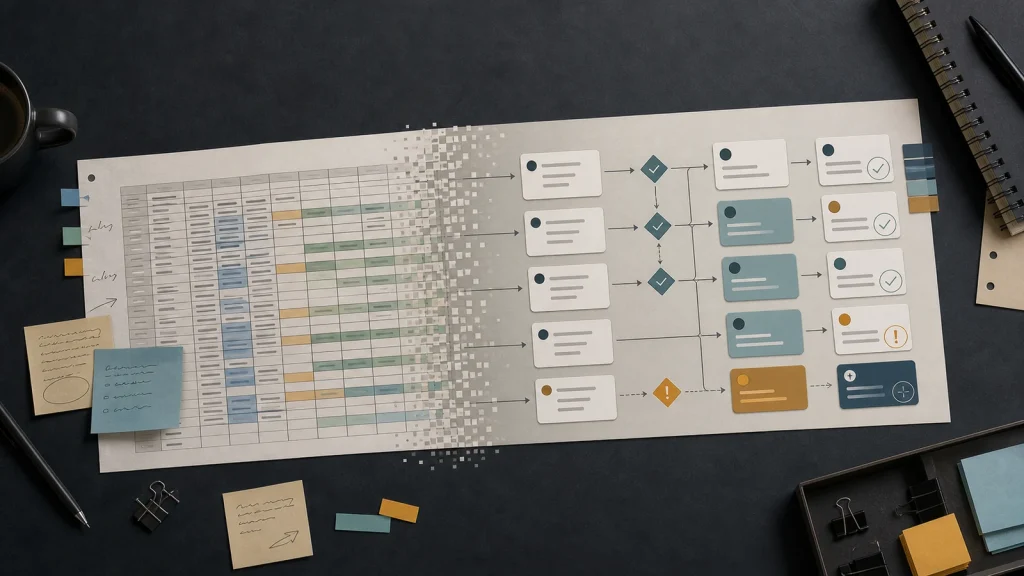
Spreadsheets break when the business starts treating rows and tabs as the workflow instead of as supporting data.
A spreadsheet can track work, but it should not be responsible for routing, approvals, ownership, and exception handling.
The signal to replace spreadsheets with software is not size alone. The signal is operational friction.
Good internal software turns the spreadsheet’s useful structure into a workflow people can trust.
The goal is not to shame spreadsheets. The goal is to stop asking them to do jobs they were not designed to do.
Most teams do not set out to build a shadow operating system in a spreadsheet. They start with a simple tracker because the work needs to move today, then add columns, statuses, and color coding as pressure grows.
That choice can be sensible. A spreadsheet is fast, familiar, and flexible. The problem begins when the spreadsheet stops supporting the workflow and starts carrying the workflow by itself.
At that point, the business is no longer using a spreadsheet. The business is using an informal application without permissions, validation, audit history, ownership rules, or a reliable user interface. That is the moment to consider whether to replace spreadsheets with software.
A spreadsheet is useful until the work needs rules.
A spreadsheet is good at organizing information, comparing values, and giving a small group a shared place to work. A workflow needs more than shared information. A workflow needs rules for who can create work, who can change it, what counts as complete, and what happens when something does not fit the normal path.
Those rules usually appear slowly. First, someone adds required columns. Then someone adds a status dropdown. Then the team invents color conventions. Then a manager asks for a summary tab. Then a second department needs a different view. Finally, people need alerts, approvals, permissions, and reporting.
Each change makes sense in isolation. Together, the changes turn the spreadsheet into a fragile interface for real business operations.
That pattern is why many internal tools start as spreadsheets. Google AppSheet, for example, describes app creation as connecting to existing data and managing it through a user-friendly interface across devices through Google AppSheet guidance on creating apps from data. The useful lesson is that teams eventually need an application layer when the spreadsheet becomes an operating surface.
The problem is usually coordination, not the spreadsheet.
Spreadsheet pain often looks like a tooling problem, but the deeper issue is coordination. People need to know what changed, who owns the next step, which records are trustworthy, and which exceptions need attention. A larger spreadsheet rarely solves those questions because the problem lives in the workflow around the file.
Consider a service business that tracks new client onboarding in a spreadsheet. Sales fills in the deal details. Operations adds launch dates. Finance checks billing status. A manager updates priority. The delivery team adds notes about missing access. Everyone depends on the file, but nobody fully owns the system.
The work might move, but the hidden cost grows. People ask if the sheet is current. Team members sort rows differently and lose context. A copied tab becomes the unofficial truth. Someone updates a field but forgets to notify the next person. A conditional format hides a problem instead of routing it.
Those are not spreadsheet failures. They are workflow design failures that the spreadsheet has been forced to absorb.
Replace spreadsheets with software when the spreadsheet starts making decisions invisible.
Teams should replace spreadsheets with software when decisions, responsibilities, and exceptions disappear inside rows. The spreadsheet may still contain useful data, but the business needs a system that makes the work legible. The decision point is not the number of rows. The decision point is whether the workflow needs structure the spreadsheet cannot enforce.
| Spreadsheet Signal | Operational Meaning | Better System Behavior |
|---|---|---|
| Multiple people edit the same fields. | Ownership is unclear. | Assign owners, permissions, and change history. |
| Status values mean different things to different teams. | The workflow lacks a shared definition of done. | Define stage rules and completion criteria. |
| People rely on color coding to know what matters. | Priority and risk are informal. | Create visible queues, alerts, and exception states. |
| Managers ask for manual summary reports. | The spreadsheet is not producing decisions. | Build dashboards around questions and actions. |
| A person must remember who to notify next. | Handoffs depend on memory. | Route work automatically with review checkpoints. |
Spreadsheet problems rarely arrive as one dramatic failure. The symptoms show up as coordination tax: confirming, cleaning, reconciling, and explaining work that should already be clear.
That cost should push the conversation beyond “Should we buy another SaaS tool?” A focused internal tool may be better when the workflow is specific, the data is shared across teams, and the business needs a clear path from intake to completion. Eckman Design has written more about that tradeoff in Internal Tools Are Often Better Than Another SaaS Subscription.
The replacement should start with the workflow, not the interface.
A better tool should not begin as a prettier spreadsheet. A better tool should begin as a map of how work moves through the business. The interface matters, but the interface should express the process: intake, validation, assignment, review, approval, exception handling, reporting, and maintenance.
The strongest first step is to identify what the spreadsheet is really doing. Some columns store data. Some columns represent decisions. Some tabs are reports. Some formulas enforce business rules. Some comments act as a history. Some color codes represent escalation paths. Each of those jobs belongs somewhere in the new system.
A practical replacement plan should answer five questions before anyone chooses a tool:
- What event creates a new record or task?
- Which fields need validation before work can move forward?
- Who owns each stage, and who can override a decision?
- Which exceptions need a separate path instead of another note column?
- Which reports should change an operational decision?
These questions keep the project grounded. The business does not need software because a spreadsheet looks messy. The business needs software because the workflow has become important enough to deserve clearer rules.
Good internal software keeps the useful parts of the spreadsheet.
The best replacement does not throw away everything the team already understands. Good internal software preserves the useful vocabulary of the spreadsheet while removing the ambiguity. Familiar fields, stages, and reports can stay. The system changes how the work is created, routed, protected, and reviewed.
For example, a project intake spreadsheet might become a simple internal application. The request form validates required details, assigns the right owner, keeps approvals in context, routes exceptions, and shows aging items or blocked work instead of only counting rows.
That kind of system does not need to be massive. A narrow tool for one painful workflow can create more value than a broad platform nobody fully adopts. The discipline is to build around the work rather than around a vendor’s demo. The same principle applies to broader business software decisions, as discussed in Small Business Software Should Match the Workflow, Not the Vendor Demo.
Data cleanup is part of the migration, not a separate chore.
Spreadsheet replacement exposes data problems that the old workflow tolerated. Duplicate records, inconsistent names, missing owner fields, vague status values, and informal notes all become harder to ignore. That friction can feel like a delay, but data cleanup is part of making the new system trustworthy.
A team should decide which data must migrate, which data should be archived, and which data should be rebuilt through the new workflow. Moving every old field into a new tool often recreates the same confusion with a different interface. A better migration identifies the information people need for future decisions.
This is also where a system of record becomes real. If the spreadsheet has been competing with a CRM, project management tool, or inbox, the replacement needs clear boundaries. One system should own the customer record. Another system may own the workflow. A dashboard can summarize both, but the source of truth should not be negotiated during every meeting. That issue shows up often in CRM data quality and system-of-record problems.
A spreadsheet should remain a tool, not become the operating model.
Spreadsheets still belong in modern operations. They are excellent for analysis, planning, quick comparisons, exports, and transitional work. The mistake is asking a spreadsheet to become the authority for who does what next, which exceptions matter, and whether the business is operating well.
When a spreadsheet becomes the workflow, the business depends on memory, habits, and invisible rules. When a workflow becomes software, the business can make ownership, review, data quality, and reporting explicit.
The practical move is simple: do not replace the spreadsheet because it is ugly. Replace the spreadsheet when the work has become important enough that the organization needs a system around it.
If your team is trying to decide whether a spreadsheet has become operational debt, Eckman Design helps turn messy workflows into practical internal systems.