
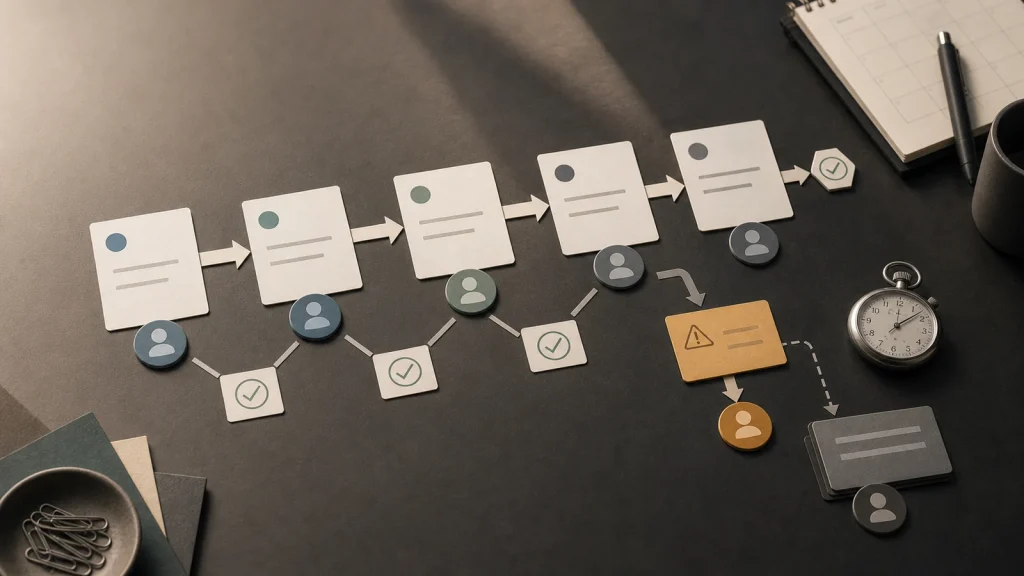
Workflow automation examples are easiest to find where work changes hands and nobody is sure what happens next.
Manual handoffs reveal the work that automation can improve because they expose ownership, timing, data, and decision problems.
A handoff is ready for automation only when the trigger, input, owner, review path, and exception path are clear.
Good workflow automation examples start small, usually with one repeatable handoff between two roles or systems.
The goal is not to remove people from the process. The goal is to stop wasting people on coordination that the system should handle.
Many teams look for automation ideas in the wrong place. They start with tools, AI features, or a list of tasks people dislike. That can produce ideas, but it often misses the real source of delay: the moment work leaves one person, system, or department and waits for the next step.
A handoff is where the business model becomes operational. A request turns into a task. A lead turns into a proposal. A signed agreement turns into onboarding. A support question turns into an escalation. A finished draft turns into review. Every handoff carries information, responsibility, timing, and risk.
That is why manual handoffs make useful workflow automation examples. They show where the organization already knows the work matters but has not designed the system around how the work actually moves.
Manual handoffs show where the workflow is really designed.
A manual handoff is not just a message from one person to another. A manual handoff is a design decision about who receives work, what information they need, how they know the work is ready, and what happens when the work is incomplete. When those rules live in memory, automation has a weak foundation.
Consider a simple intake process. A website form creates an inquiry. Someone checks whether the inquiry is qualified. Another person adds notes to the CRM. A manager assigns a follow-up. The prospect waits while the team confirms details across email, form submissions, and a spreadsheet.
The visible task might be “respond to the lead.” The workflow problem is the handoff from inquiry to qualification to ownership. If that handoff is unclear, automation may send a faster response without making the business more reliable.
Formal process modeling has long treated events, activities, gateways, and responsibility lanes as important process elements. The Object Management Group’s Business Process Model and Notation specification gives teams a shared language for describing how work flows. Most small businesses do not need formal BPMN diagrams to automate a workflow, but the discipline is useful: name the trigger, the work, the decision, the owner, and the path.
A good handoff has five parts.
A useful handoff is specific enough that another person or system can understand what to do next. If the handoff depends on a person remembering context, searching for missing information, or interpreting a vague status, the workflow is not ready for dependable automation.
| Handoff Element | Question To Answer | Automation Risk If Missing |
|---|---|---|
| Trigger | What event starts the next step? | The automation fires too early, too late, or not at all. |
| Input | What information must travel with the work? | The next owner receives incomplete context. |
| Owner | Who is responsible for the next decision? | Work enters a shared queue and stalls. |
| Rule | What condition decides the next path? | The system routes edge cases as if they were normal. |
| Exception | What happens when the work cannot proceed? | People create side channels to handle problems. |
This table also explains why many automation projects feel harder than expected. The tool can send the notification, create the ticket, move the record, or draft the message. However, the tool cannot invent the business rule if the team has never agreed on it.
Workflow automation examples should start with narrow handoffs.
The best workflow automation examples start with a narrow handoff because narrow handoffs are easier to inspect, test, and improve. A team can define the trigger, required data, owner, and expected output without redesigning the entire business at once.
For example, a support team might automate the handoff from new ticket to triage. The system can check whether the customer provided order number, product type, issue category, and urgency. If required fields are missing, the system can ask for more context. If the issue is urgent, the system can route it to a review queue. If the issue fits a known pattern, the system can prepare a draft response for human approval.
That is a better starting point than “automate support.” The narrow handoff gives the team a real workflow boundary. It also makes success easier to measure: fewer missing details, faster triage, clearer ownership, and fewer avoidable escalations.
The same principle applies outside support. Sales can automate the handoff from qualified lead to proposal owner. Operations can automate the handoff from approved request to scheduled work. Finance can automate the handoff from completed service to invoice review. Content teams can automate the handoff from draft to editorial review.
Automation should reduce coordination, not hide the work.
A handoff automation should make the workflow more visible. If the automation hides the current owner, suppresses exceptions, or moves work without review, the team may get speed while losing control. Better automation gives people a clearer view of where work is, why it moved, and what still needs judgment.
This matters when AI enters the workflow. An AI-assisted system might summarize a request, classify an issue, draft a next step, or recommend a route. Those outputs still need boundaries. The system should show which source data informed the suggestion, when confidence is low, and which human owner must approve the next action.
That is why an automation readiness conversation should inspect the workflow before the model. Eckman Design covers that foundation in An AI Automation Readiness Audit Should Start With the Workflow.
A practical way to find the first automation candidate.
A team does not need a large transformation plan to find a good first automation candidate. The practical move is to inspect the handoffs that create delay, rework, repeated clarification, or owner confusion. Those handoffs usually contain the strongest early examples.
- List the handoffs that happen every week.
- Mark where information is missing, duplicated, or retyped.
- Identify who owns the next decision at each stage.
- Separate normal paths from exception paths.
- Choose one handoff where clearer routing would save time without increasing risk.
This approach keeps automation grounded. The business is not choosing a tool because automation sounds useful. The business is choosing a workflow moment where automation can remove coordination cost and improve reliability.
It also avoids the trap of automating a broken spreadsheet, inbox, or dashboard without changing the operating model. When a spreadsheet has become the workflow, the team may need internal software before more automation. Eckman Design discusses that boundary in Spreadsheets Break When They Become The Workflow.
The right first example creates a repeatable pattern.
The best first automation project teaches the business how to automate responsibly. A good handoff example creates patterns for triggers, validation, ownership, exception handling, review, and measurement. Those patterns can then support more complex workflows later.
That is the real value of starting with manual handoffs. The team learns how to turn messy coordination into a designed system. Once that pattern works in one place, automation becomes less speculative and more operational.
If your team is trying to decide where automation should start, look for the handoff where people spend the most time asking, “Who has this, what changed, and what happens next?” That question usually points to the first useful workflow automation example.
Eckman Design helps teams turn manual handoffs into practical workflow systems that are easier to operate and safer to automate.