
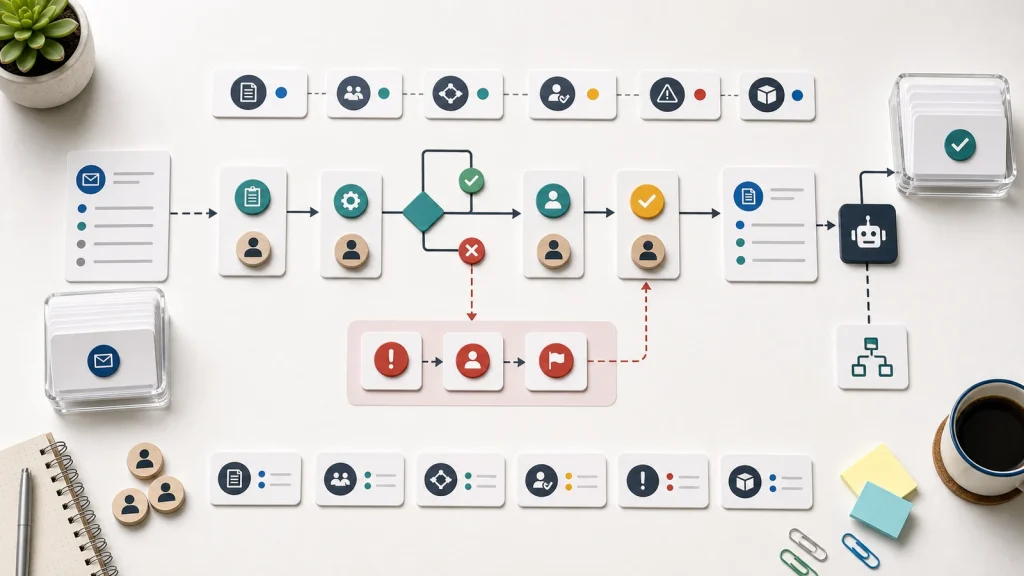
Business process documentation fails when it records steps but leaves out the decisions that make the workflow operate reliably every day for the whole team.
Useful process documentation shows triggers, inputs, decisions, owners, approvals, exceptions, outputs, and review paths.
A step list can explain activity, but it often hides responsibility and judgment.
Automation needs the decision logic behind the work, not only the visible task sequence.
Start with one real workflow and document how work moves when things go right and when they do not.
A Step List Is Not Enough
Many teams document processes as a numbered list. Open the request. Review the details. Assign the owner. Send the response. Update the record. Close the task.
That kind of list is better than nothing, but it rarely explains how the business actually works. The list does not show what makes a request complete, who decides whether it should move forward, which system owns the data, or what happens when the normal path breaks.
Those missing details matter because they are where automation usually fails. A workflow builder can move a record from one place to another, but it cannot guess the business rule behind a decision. If the rule only lives in someone’s memory, the automation will either stop too often or act with false confidence and hidden operational risk.
Business process documentation should make the work explainable before the business tries to automate it. A clear process map gives operators, managers, and technical teams the same view of the workflow.
Document The Trigger And The Inputs
Every useful process starts with a trigger and a set of required inputs. The trigger explains why the workflow begins. The inputs explain what information the workflow needs before anyone can make a good decision.
For example, a customer intake workflow may begin when a form is submitted, an email arrives, a call is logged, or a referral is entered. Each trigger can create a different path. A form may include structured data. A phone call may require someone to capture context manually.
The documentation should name the source system, required fields, optional context, and quality checks. If the intake needs a service type, deadline, budget range, account status, or contract detail, that information should be visible in the process map.
This connects directly to customer intake workflows. Capturing a request is only the beginning. The business still needs a clear path for making sense of the information.
Show The Decision Points
Decision points are the parts of the workflow where business judgment changes the path. Good documentation names those decisions directly instead of hiding them inside vague actions.
A step that says “review request” is too thin. A better version explains what the reviewer decides. Is the request complete? Is the customer eligible? Does the issue require escalation? Is the opportunity qualified? Does the work need approval before it moves forward?
The Camunda BPMN primer is useful because it shows how process models use events, tasks, gateways, and flows to represent how work moves. The business does not need to overcomplicate the map, but it should understand that decisions and paths are different from simple tasks.
When decision points are documented, automation becomes more realistic. The team can decide which decisions can be rule-based, which need human review, and which need better data before any system should act.
Name Owners And Approval Paths
Business process documentation should make ownership visible. A workflow without owners becomes a set of tasks that everyone assumes someone else will handle.
Ownership is not only the person doing the work. The documentation should show who owns the workflow, who owns each handoff, who approves exceptions, who updates the rules, and who reviews performance. That distinction prevents informal tools from becoming hidden infrastructure.
Approval paths need the same clarity. Some approvals protect quality. Some protect financial risk. Some are old habits that slow the workflow without improving the decision. Process documentation should make those differences visible so the team can improve the workflow instead of preserving every checkpoint by default.
This is why low-code automation needs workflow ownership. A tool can execute a path, but the business has to decide who is responsible for keeping that path useful.
Capture Exceptions Before They Become Workarounds
Exceptions reveal how the workflow behaves under pressure. A process map that only shows the ideal path will not prepare the business for real operations.
Common exceptions include missing information, duplicate records, unclear ownership, urgent requests, compliance concerns, customer complaints, system outages, and approval delays. Each exception should have a response path, even if that path is manual review.
Exception paths also help the team decide where automation should stop. A system can flag a duplicate. It may not be able to decide which record contains the correct history. A system can detect missing required fields. A person may still need to decide whether the request can move forward anyway.
The best process documentation treats exceptions as part of the design, not as embarrassing edge cases. That makes the workflow safer to automate and easier to improve.
Document Outputs And Success Measures
A workflow should produce a clear output. The output might be a qualified lead, resolved ticket, approved invoice, published page, scheduled project, updated record, or decision memo. If the output is vague, the process will be hard to measure.
The documentation should also define success. Time saved is useful, but it is not the only metric. Better measures include fewer duplicate records, fewer stalled handoffs, faster useful response, fewer reopened requests, cleaner reporting, and higher trust in the system of record.
Those measures connect documentation to business value. The team can see whether the process is easier to operate, not just whether a diagram exists.
Keep The Documentation Close To The Work
Business process documentation loses value when it sits apart from the workflow it describes. A document that only lives in a shared folder will drift as soon as people change fields, tools, owners, or approval habits.
The documentation should have a review owner and a review rhythm. If the workflow changes, the map should change with it. If an exception happens every week, the exception should move from tribal knowledge into the documented process.
Process documentation should also connect to the systems people use. Link the map to the form, CRM field, task board, dashboard, template, or policy that controls the work. That keeps documentation from becoming a separate artifact and makes it part of how the team operates.
A Practical Starting Point
Start with one workflow that people already complain about. Follow a real item through the process from trigger to output. Write down the inputs, decisions, owners, approvals, exceptions, systems, and measurements that appear along the way.
Do not try to document every process at once. A useful map of one workflow will teach the business more than a shallow inventory of twenty. The goal is to create enough clarity that the team can improve the work, assign ownership, and decide where automation belongs.
Business process documentation is valuable when it helps people make better decisions. If the document only lists steps, keep going. The real workflow lives in the choices, handoffs, and exceptions behind those steps.