
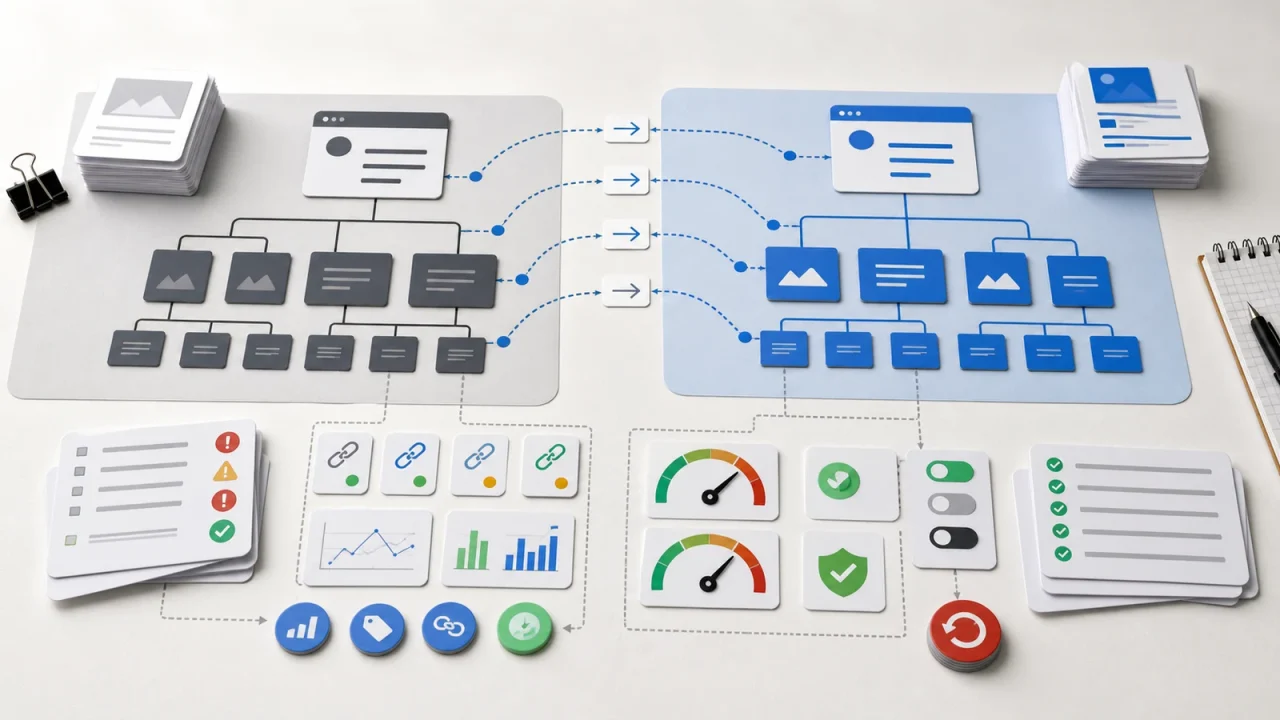
A website migration checklist should start with how the site will operate after launch, not only how pages will move.
A migration is an operational change, not just a design launch or hosting move.
The checklist should protect redirects, content ownership, analytics, privacy, performance, SEO signals, and rollback decisions.
The most important risks usually live between teams: marketing, operations, development, analytics, and leadership.
A strong migration plan defines what must not break, who owns each check, and how the team will respond after launch.
The Migration Is An Operations Change
Many website migrations start as a technical task. Move the site. Preserve the content. Launch the new theme. Update the DNS. Check the homepage. Celebrate the new design.
That framing misses the real risk. A business website is not just a collection of pages. It is a publishing system, a lead qualification layer, a search asset, an analytics source, a privacy surface, and a place where prospects decide whether the company feels credible.
When the migration plan focuses only on moving files, the business often discovers the operational gaps after launch. Forms route to the wrong inbox. Thank-you pages stop firing analytics events. Redirects miss important URLs. Old content comes over without an owner. Privacy notices lag behind tracking changes. The team cannot tell whether traffic changed because the new site is better or because measurement broke.
A better website migration checklist starts with continuity. What must keep working for customers, prospects, search engines, internal teams, and the people who publish the site every week?
Start With What Must Not Break
The first migration question should be simple: what must not break on launch day? The answer gives the team a practical checklist that goes beyond design approval.
For most business websites, the critical list includes contact forms, scheduling flows, lead magnets, ecommerce checkout, paid campaign landing pages, major organic landing pages, analytics events, consent tools, important redirects, sitemap generation, robots directives, accessibility basics, and publishing access for the people who maintain the site.
Each item needs an owner. “Check forms” is weaker than “confirm the contact form sends to the sales inbox, creates the right CRM notification, stores the submission where expected, and shows the correct confirmation page.” The second version tells someone what success means.
The checklist should also separate launch blockers from follow-up work. A typo on a low-traffic archive page may not block launch. A broken quote request form should. A missing image alt attribute may go into a post-launch accessibility sprint if it is not blocking use. A noindex directive on the production site should stop the release.
This distinction keeps the team from treating every issue as equal. Migration work needs judgment. Without priorities, teams either launch with preventable defects or delay the launch because the checklist has no risk model.
Redirects Are An Operating Detail, Not A Last-Minute SEO Task
Redirect planning belongs near the beginning of the migration. Redirects preserve user paths, search signals, bookmarked URLs, campaign links, and old content references that still matter.
The technical mechanics matter. MDN’s HTTP redirection guide explains how redirects tell the browser that a requested resource has moved and describes the difference between temporary and permanent redirect behavior. For a business migration, that means the team must decide which old URLs should map permanently, which should remain temporary, and which should return a cleaner status because the content no longer exists.
A migration checklist should include a redirect inventory before launch. Export current URLs from analytics, search console data, the CMS, XML sitemaps, backlink tools, paid campaigns, email templates, and any manually maintained landing pages. Then map each meaningful URL to its best new destination.
Do not redirect every retired page to the homepage. That may look tidy in a spreadsheet, but it creates a poor user experience and weakens the signal that the old page had a specific purpose. Redirect to the closest useful replacement when one exists. When no replacement exists, decide intentionally how the site should respond.
After launch, test the redirect list from outside the CMS. A redirect that works in a plugin screen but fails at the edge, cache, proxy, or hosting layer still fails for users. The checklist should verify real URLs in the live environment.
Content Ownership Matters More Than Page Counts
A migration is a chance to decide which content still deserves to exist. Moving every page without review preserves old debt inside a new design.
Content inventory work should identify the page purpose, target audience, owner, last review date, search value, conversion value, compliance risk, and recommended action. Keep, improve, consolidate, redirect, archive, or remove. Those decisions should happen before the team starts copying content into the new system.
This matters because a new CMS does not make stale content easier to trust. A service page with old pricing language still creates confusion. A privacy page that does not match tracking behavior still creates risk. A blog archive full of thin or outdated posts still weakens the site experience.
Content ownership also affects the future publishing workflow. Who can publish? Who reviews regulated claims? Who updates case studies? Who owns service pages? Who checks broken links? Who decides when a page should retire?
The same operational lesson appears in other systems. When spreadsheets become the workflow, the business eventually needs ownership, review rules, and a maintainable system. Website content follows the same pattern.
Analytics, Privacy, And Performance Need Owners
A migration can make the new site look better while making the business less informed. That happens when analytics, privacy, and performance checks sit at the edge of the project instead of inside the launch plan.
Analytics needs a measurement checklist. Confirm the analytics property, tag manager setup, consent mode or privacy tool behavior, key events, form confirmations, campaign parameters, search console verification, and dashboard definitions. If the team changes URLs, forms, or thank-you pages, the measurement model may need to change too.
Privacy needs a behavior check, not just a policy check. Identify which scripts load before consent, which vendors receive data, which forms collect sensitive information, how long submissions remain stored, and whether the privacy language matches actual site behavior.
Performance needs real-page testing. A fast homepage does not prove that service pages, templates, landing pages, and blog posts perform well. Test the pages that matter to users and to the business. Watch mobile experience, image weight, third-party scripts, caching, and template-level problems.
Dashboards can help after launch, but only when they show useful decisions. A migration team should avoid building reports that simply display activity. As with a good dashboard that replaces status meetings, the measurement layer should help the team decide what to inspect next.
Build A Launch Plan The Team Can Run
The best website migration checklist is not a giant shared document that everyone ignores until launch week. It is a working plan with owners, sequence, status, and escalation paths.
A practical launch plan should define who approves content, who freezes changes, who manages DNS, who watches uptime, who validates forms, who checks redirects, who monitors analytics, who communicates with stakeholders, and who can roll back or pause the release.
The plan should also include a short post-launch window. Many migration problems appear after the site receives real traffic. Search engines crawl old URLs. Prospects submit forms. Campaign links route through older paths. Editors use the CMS in ways the project team did not test.
- Check uptime, SSL, cache, redirects, and crawl access.
- Submit or verify the sitemap and inspect critical URLs.
- Test key forms and confirmation pages from real devices.
- Confirm analytics events and dashboards receive expected data.
- Review error logs, broken links, and 404 reports.
- Watch rankings and traffic by landing page, not just sitewide totals.
- Collect editor feedback from the people who publish content.
This kind of plan makes the migration easier to manage because it turns vague anxiety into observable checks. The team can see what works, what needs repair, and what can wait.
The Better Migration Outcome
A good migration does more than avoid visible breakage. It leaves the business with a website that is easier to operate.
That means the CMS matches the publishing workflow. Templates support the content the business actually maintains. Redirects protect useful paths. Analytics answer real questions. Privacy behavior matches the stated policy. Performance remains visible after launch. Ownership is clear enough that the site does not decay the moment the project ends.
When a migration starts with operations, the checklist becomes more than a launch control sheet. It becomes a way to decide how the website should support the business after the new design is live.
If your migration plan only lists pages, plugins, and launch tasks, add the operational layer before work starts. Ask what must keep working, who owns each check, and how the team will know whether the new site is performing better. That is where the migration becomes a business improvement instead of a technical swap.
Discussion
0 Comments